--> Skip to main content

How To Earn Training Points To Upgrade Players In Madden 21

Training Points are the new addition in Madden, which allows you to upgrade your players. In Madden 21, your roster of footballers can be further strengthened by using training points to enhance their overall performance on the playing field. In this guide, we'll be putting together all the methods of earning Training points quickly, as well as how you can put the points to good use to upgrade your squad.

First, Below we have listed all the various methods in the game to earn training points in Madden 21.
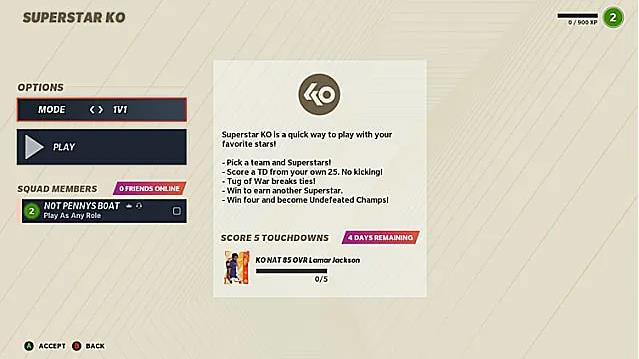


Play Superstar KO - Head into Superstar KO game mode, and you'll realize that initially, you need to perform a specific task in order to get a reward. In the game's launch week, players who qualified with enough wins could net themselves a sterling Lamar Jackson card, for example. If you don't need Jackson to play QB for your squad, you can simply quick-sell it to get 500+ training points. Every two weeks or so the reward will change, and you can keep selling the rewards to get some easy training points for yourself.
 

Sell Unwanted Cards - If you dedicate most of your time to the game's Ultimate Team mode, you'll earn player cards very often, but they won't always be the right players for your team. Should you find yourself with a stack of cards you don't need or want, you can quicksell them in the cards' options. The better the card, the more Training Points you'll acquire in the exchange, so even if you aren't going to use a great card you unlock from certain challenges, it may benefit you to complete them anyway. 
 

Complete MUT Challenges - There is no shortage of challenges to complete in Madden Ultimate Team. Truly it would take a full-time commitment to even approach reaching the end of the game's challenge tree, and by the time you got there, the game would likely have updated with more. Challenges regularly dole out more Training Points to MUT players, so it's best to stay on top of these to keep the Training Points coming in.

When you have enough training points, then you can be used to upgrade players that you've already got the cards for.

To use Training Points, bring up your Madden Ultimate Team lineup and press X or Square to open up the Options menu. If you've got enough points, you'll be able to select the 'Upgrade' option, which will then take you to a breakdown of that character's stats and abilities. If you have enough training points, you'll be able to upgrade the card and increase its rating.

What you can then do with Training Points varies from player to player, depending on their stats and abilities. Some may unlock new abilities, while others may simply see their OVR rating increase. Take the time to figure out how best to spend Training Points on your team.

That's everything you need to know on how to get Training Points in Madden 21. For more tips and tricks, be sure to check out our guide. In addition, this is one of the best places that buy cheap madden 21 coins. And 100% safe. With these coins, you can help your team gradually perfect!


Comments

Popular posts from this blog

Simple And Effective Skill Moves In FIFA 23

Skills are a crucial part of FIFA 23 and can make a big difference against the best players. Using these skill moves effectively can be the difference between creating a big chance and giving up possession cheaply. There are plenty of skill moves to choose from in the game, so we will show you three simple but effective special moves. The Drag Back, a two-star skill move A drag back is a skill move that allows you to change direction quickly. In football, it is sometimes referred to as the Cruyff turn, named after the legendary Dutch player Johann Cruyff who made the famous move back in the 1990s. Successfully pulling one off will see your player change direction 180 degrees and put space between them and the defender, which means you can then put in a cross or take a shot. To drag back in FIFA 23, you need to hold both R1 and L1 on PS (LB and RB on Xbox) while moving the left stick in the opposite direction to where your player with the ball is moving. This flexibility makes the speci...

What To Do First In Madden 21 Ultimate Team

Madden 21 is the newest entry in the Madden series and has been released for a while. It's time to plan your path to domination in Ultimate Team. Ultimate Team (commonly referred to as MUT) is an online game mode in the Madden Series. The Ultimate Team's goal is to level up your team with different tiered trading cards as much as possible until you are satisfied with it, then compete online. This guide will provide tips for what to do first in Ultimate Team when the player. Scout Out The Solo Challenges The first thing you should do is look through the solos. There will be something that gives you a solid reward within the solos, so have a look and plot your best team early on so that you don't end up with a stack of top-end players that you can't auction or play. Pick Your Captain Right Team captains quickly become your best players in the early stage of the game. When starting up your Madden Ultimate Team (MUT), you will receive a MUT Captain after completing a series...

6 Tips For Beginners In New World

New World is an open-world MMO filled with danger and opportunity where you’ll forge a new destiny for yourself as an adventurer shipwrecked on the supernatural island of Aeternum. Endless opportunities to fight, forage, and forge await you among the island’s wilderness and ruins. Channel supernatural forces or wield deadly weapons in a classless, real-time combat system, and fight alone, with a small team, or in massed armies for PvE and PvP battles. If you are a beginner of New World and looking for some tips on the game, this guide will show you 6 tips for whoever is new to this game. Let’s check it out. 1. Use Your Map And Compass To Find Resources The game does a pretty good job of introducing to you the basic elements when starting out using the main story quest. It doesn’t tell you, though, how you can utilize your map and compass to find your way around the game world. For starters, the map can be opened by default with the hotkey ‘M’. On the left-hand side, the second tab, “Re...